

Manage registrations and logins on your WordPress site
🚀 The Av Member Fidelity plugin boosts user engagement by providing features for managing registrations and logins on your WordPress site.
✨ Features :
✔ Menu button in the form of a shortcode allowing you to manage connections
✔ Connexion shortcode which allows you to easily create a connection page where you can connect, register, reset your forgotten password.
✔ Account shortcode, which makes it easy to create a ‘My account’ page where you can view your account details . It also allows you to change your password.
✔ Thanks to these features, easily create conditional blocks, displayed depending on whether the user is logged in or not.
🛠 Perfect for boosting user engagement!
There are tow simple ways to install Av Member Fidelity:
1️⃣ Install from the WordPress Plugin Directory (Coming soon, not yet available)
- Go to your WordPress dashboard.
- Navigate to Plugins > Add New.
- Search for “Av Member Fidelity” in the plugin repository.
- Click Install Now, then Activate.
2️⃣ Manual Installation via ZIP (Coming soon)
- Download the latest version of
av-memberfidelity.zip. - In your WordPress dashboard, go to Plugins > Add New.
- Click Upload Plugin, then select the ZIP file.
- Click Install Now, then Activate.
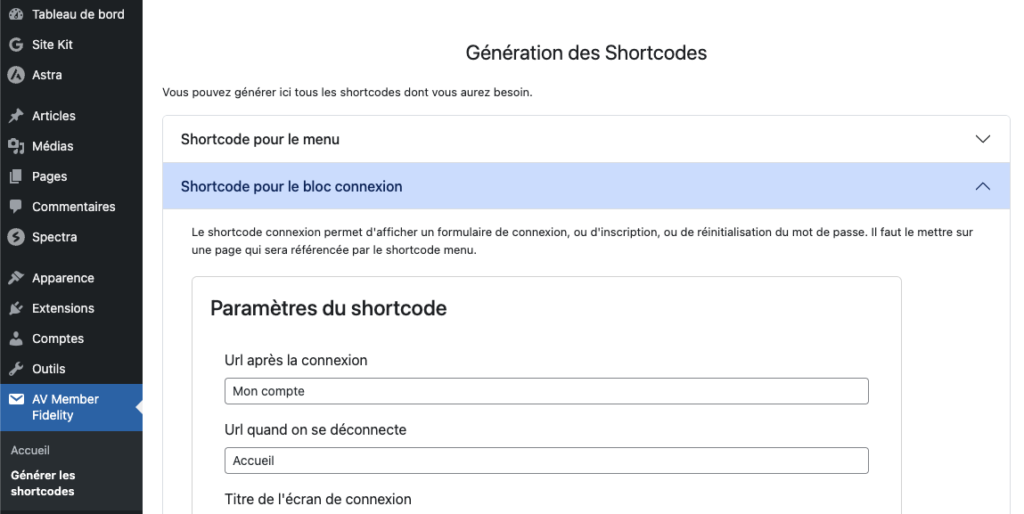
- Start by generating the ‘connection’ shortcode. Go to the plugin configuration, ‘Generate shortcodes’ tab and choose ‘Shortcode for the connection block’:
- Fill in all the shortcode parameters and then generate the shortcode:
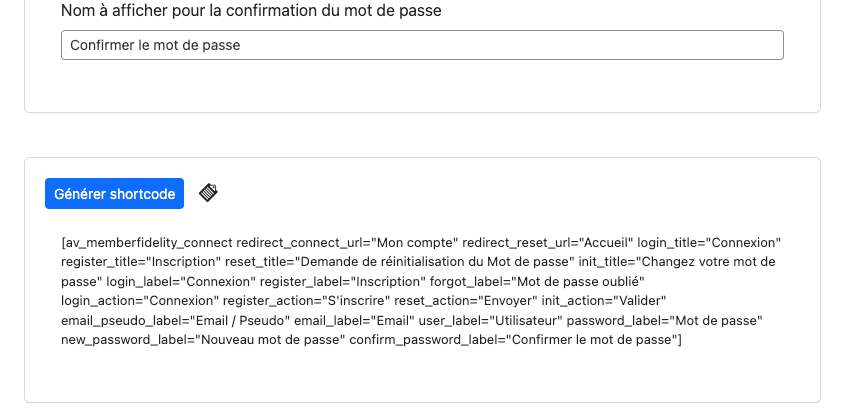
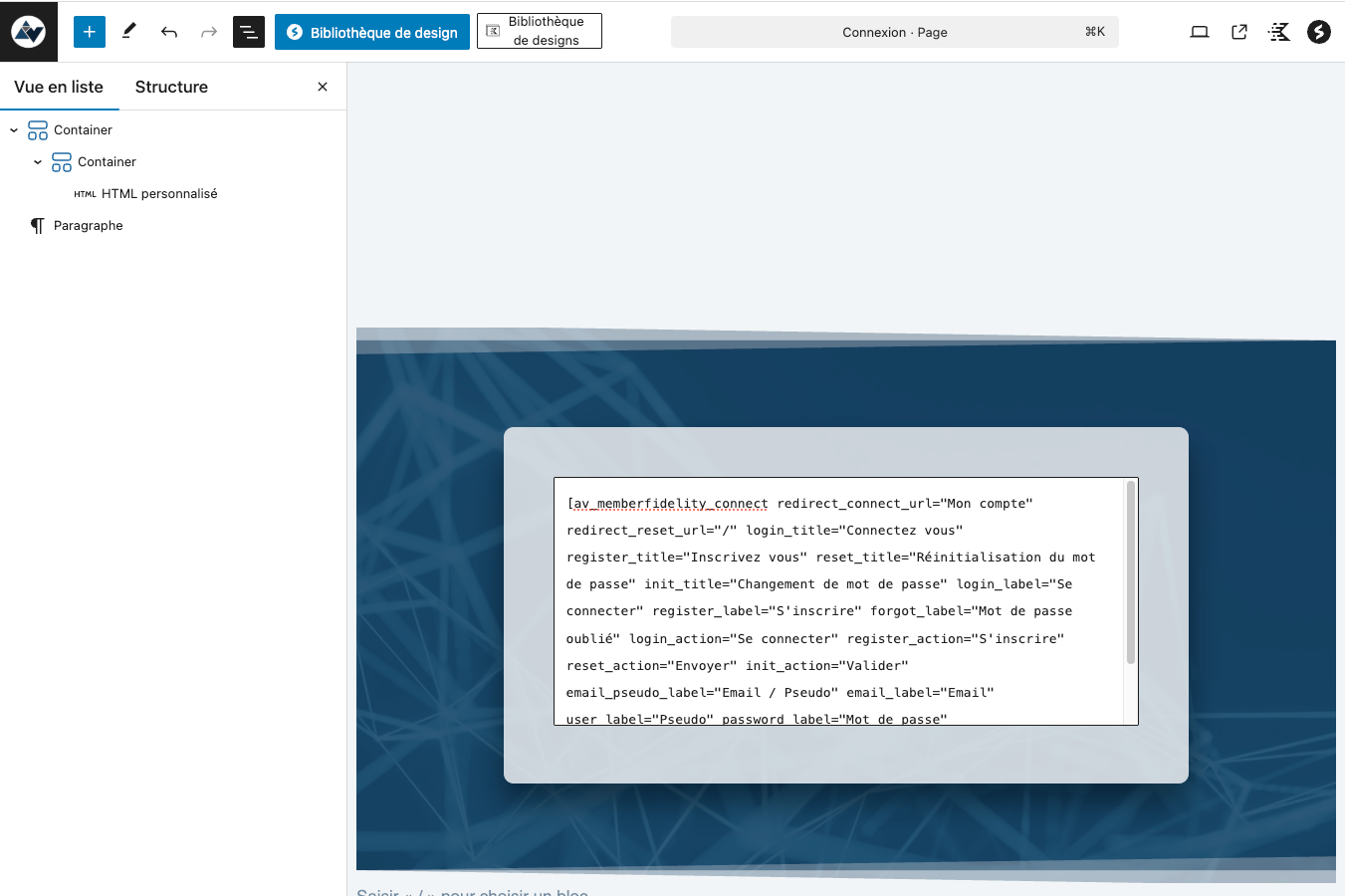
- Copy the shortcode by clicking on the copy icon and now go to the ‘Pages’ menu in wordpress to create or update your login page. Insert a ‘shortcode’ block in the page and copy the generated shortcode. Save, the page is now ready. Remember its ‘slug’ or access name for the rest of the configuration.
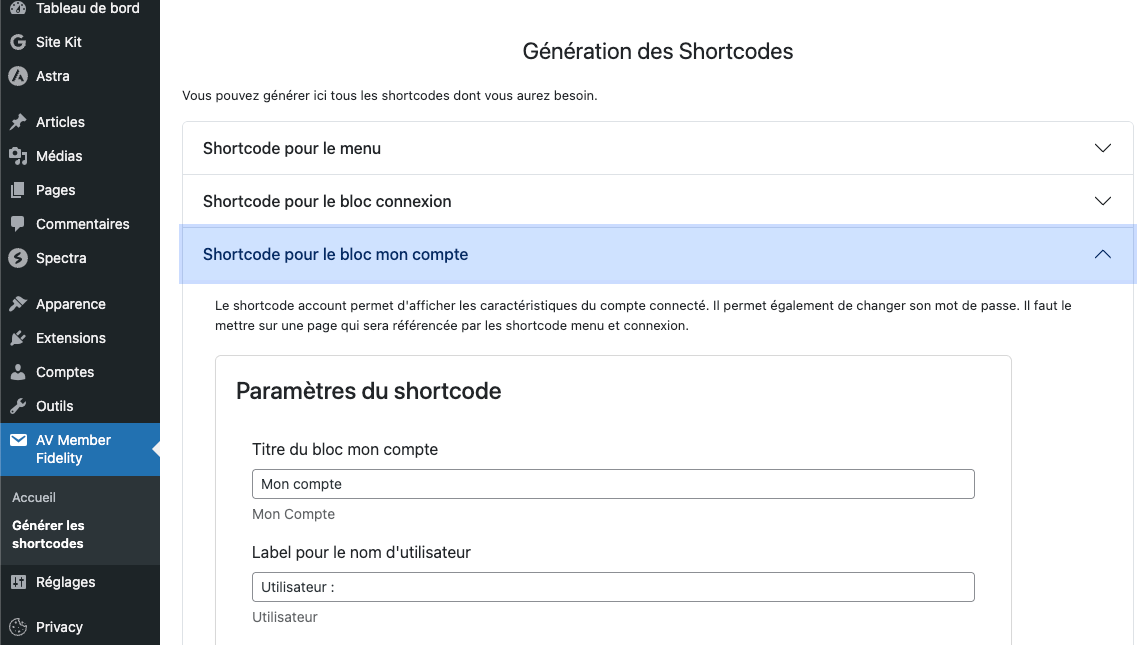
- Start by generating the ‘account’ shortcode. Go to the plugin configuration, ‘Generate shortcodes’ tab and choose ‘Shortcode for my account’ block:
- Fill in all the shortcode parameters and then generate the shortcode:
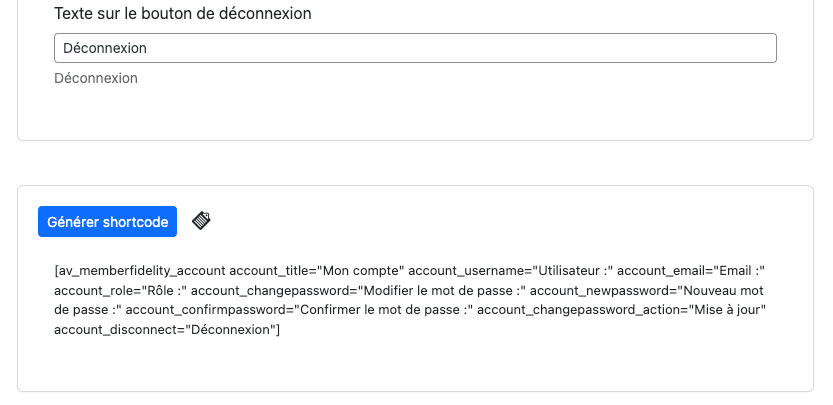
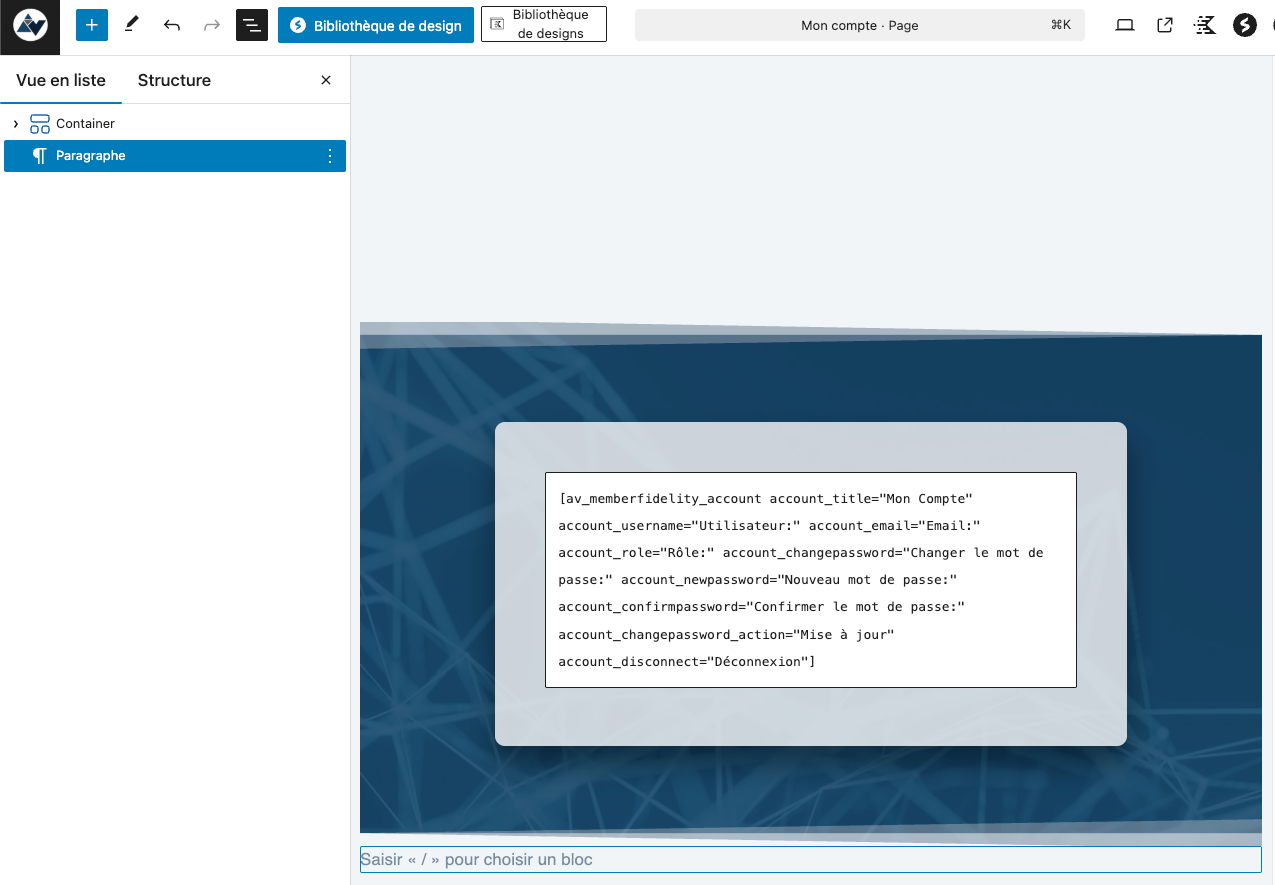
- Copy the shortcode by clicking on the copy icon and now go to the ‘Pages’ menu in wordpress to create or update your ‘my account’ page. Insert a ‘shortcode’ or ‘custom HTML’ block in the page and copy the generated shortcode. Save, the page is now ready. Remember its ‘slug’ or access name for the rest of the configuration.
- Start by generating the ‘menu’ shortcode. Go to the plugin configuration, ‘Generate shortcodes’ tab and choose ‘Shortcode for the my account block’. Fill in all the shortcode parameters and then generate the shortcode:
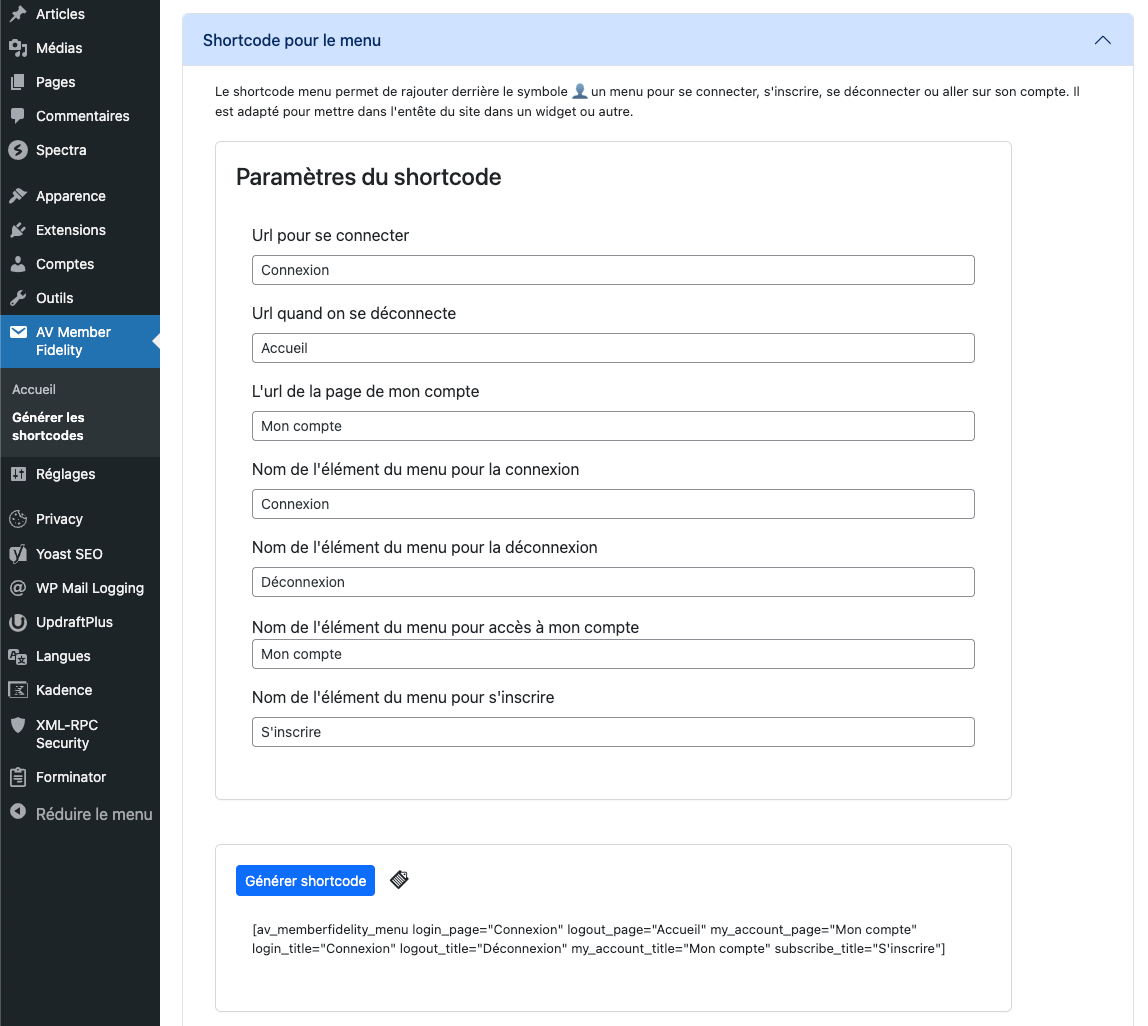
- Copy the shortcode by clicking on the copy icon and now go to the ‘Appearance’ and ‘Customise’ menus. Go to the header and place a widget or html block wherever you like, like widget 1 below:
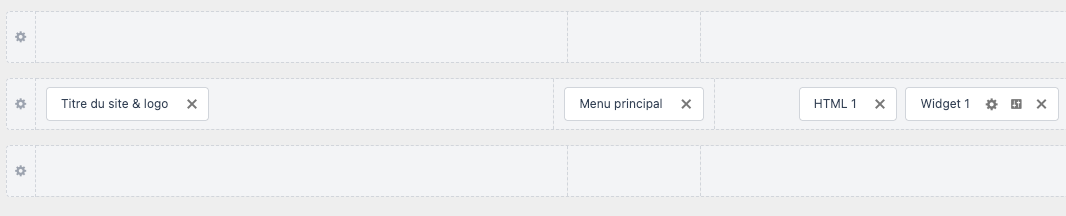
- Configure the block to add your previously generated and copied shortcode. You should see an icon appear in your header that will allow you to open a menu, either login/register if you’re not logged in, or my account/logout if you’re logged in.

What is the purpose of the plugin?
This plugin allows visitors to build loyalty by offering them the option of creating an account. Once logged in, users can access exclusive content, such as pages or articles reserved for logged-in members.
How do I set up the registration/login system?
The system is set up in 3 simple steps, using shortcodes:
- Create a login page.
- Creation of a ‘My account’ page.
- Add a login button to the site header.
📖 All the details are explained step by step in the manual supplied with the plugin.
Are registered users WordPress users?
Yes, when a visitor registers, they become a ‘standard’ WordPress user.
However, they do not have access to the administration interface (the WordPress dashboard).
💡 It is recommended to change the default WordPress login URL, to avoid any manual access to /wp-admin.
What is the WordPress role of registered users?
When users register, they automatically get the ‘subscriber’ role, which is the most limited role in WordPress.
👉 Even if they access the admin interface via a direct link, they will only see their account information.